The Stars.md connector brings your account into your chat with an AI assistant: search influencers, open reports, build lists and exports by asking in plain words. All within your plan's limits, exactly as in the web app.
The button opens Claude's "Add custom connector" dialog with the name and URL already filled in. You review and confirm: nothing is added without your confirmation.
MCP server URL
https://app.stars.md/mcp
What you can do from the chat
Search influencers
Filter by country, city, category, followers, engagement rate, posts, verified status and audience (country, gender, quality). Or find a profile by @username, link or name.
Open reports
Followers, ER, average likes, comments and views, Audience Quality Score, audience countries, cities, gender and age, contacts. Plus follower growth and similar influencers.
Keep lists and notes
Create lists, add or remove profiles and save your notes on influencers.
Request fresh data
Start a new statistics collection for a profile and check when it is ready. It takes a few minutes.
Work with campaigns
See your campaigns, add creators and update their details — on accounts with campaigns enabled.
Export results
CSV right in the chat, or a link to an XLSX file valid for one hour.
How to connect
You need a Stars.md account. Sign in with the same e-mail and password, or with Google, as in the web app.
No account? Create one for free
Claude: web, desktop and mobile
Easiest: press "Add to Claude", check the name and URL, and confirm. Or add the connector by hand:
In Claude open Customize → Connectors (claude.ai/customize/connectors) and press "Add custom connector".
Enter the name Stars.md and the URL https://app.stars.md/mcp, press "Add", then "Connect".
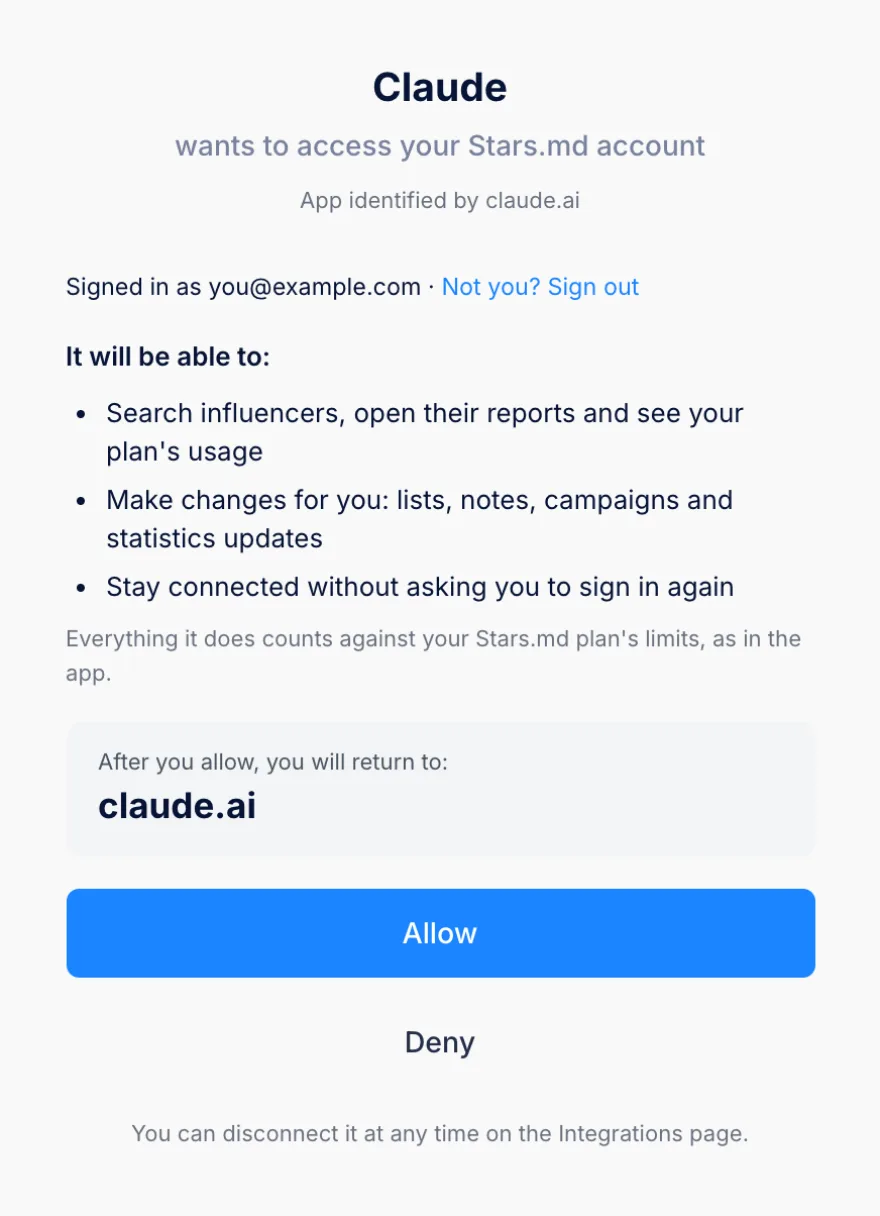
In the window that opens, sign in to your Stars.md account and press "Allow" on the consent screen.
In a chat, open + → Connectors and switch Stars.md on. Then ask in plain words.
The consent screen names the app and what it may do. Press Allow to connect.
Add to Claude
A connector added on claude.ai is available in the Claude desktop and mobile apps too. Custom connectors can be added on every Claude plan (Free, Pro, Max, Team, Enterprise); on Team and Enterprise an organization Owner may need to add it for the organization first.
Claude Code
Run the command in a terminal:
claude mcp add --transport http stars https://app.stars.md/mcp
In Claude Code type /mcp, choose the stars server and press "Authenticate".
The browser opens the sign-in and the consent screen: sign in and press "Allow".
ChatGPT (developer mode)
In ChatGPT, Stars.md is added as a custom app in developer mode:
Turn on Developer mode in ChatGPT settings: Settings → Apps & Connectors → Advanced settings. Menu names can differ between accounts and plans.
Create a custom app: name Stars.md, MCP server URL https://app.stars.md/mcp, authentication OAuth. Confirm the warning and create it.
Sign in to Stars.md and press "Allow".
In a chat, pick Stars.md from the developer-mode tools.
Developer mode is available only on the ChatGPT plans that offer it; in Business and Enterprise workspaces an admin may need to allow custom connectors. The connector is not published in the ChatGPT app directory.
Other MCP clients
Any client that supports remote MCP servers over Streamable HTTP with OAuth: add a server with the URL https://app.stars.md/mcp. The client discovers the OAuth sign-in from the server.
For the Claude API and scripts you can use a personal API key (Pro and Premium plans), passed as the MCP connector's authorization_token. You create the key in your account, on the Integrations page.
Example prompts
Write as you would to a colleague. A few ideas:
Find 20 beauty creators in Chișinău with 10–50k followers and an engagement rate above 3%.
Audit @username: audience quality, top countries and follower growth over the last year.
Compare the audiences of these two creators by country and gender.
Find influencers similar to @username.
Add the first ten to a new list "Spring launch" and export it to CSV.
How many profile views do I have left this month?
The connector also comes with two ready-made prompts: finding creators for a brief and auditing an influencer.
Plans and limits
The connector works on every plan, Free included.
Every action uses the same limits as the web app: searches, profile views, advanced (audience) filters, data update requests and exports.
Opening a profile you have already viewed in the current period is free.
On the Free plan you see the first 8 results of a search, as on the website, and its limits are one-time.
Bulk actions (adding or exporting many profiles at once) and personal API keys are available on the Pro and Premium plans.
Connecting uses OAuth 2.1 with PKCE: you sign in to your Stars.md account directly, and the AI app never sees your password.
You decide what it can do
The consent screen names the app asking for access and what it will be able to do: search and open reports, make changes (lists, notes, campaigns, statistics updates) and stay connected without signing in again.
Disconnect any time
See every connected app on the Integrations page of your account. Press "Disconnect" and access ends at once. Changing your password disconnects every app.
Short-lived access
Access tokens live one hour and renew automatically. A connection that is not used lapses after 30 days.
Confirmation before changes
Actions that change data are separate from reading. Claude asks before removing someone from a list, replacing a note or updating a creator in a campaign.
What we record
Which tool was called, whether it succeeded, how long it took, which app and which account. We keep this for 90 days, for limits, support and abuse prevention. We do not receive or store the chat conversation.
The AI app receives the results of the tools it calls (influencer data, your lists and so on) and handles them under its own terms (Anthropic, OpenAI).
Privacy policy
Frequently asked questions
Do I need a paid plan?
No. The connector works on every Stars.md plan, Free included, with the same limits as the web app. Bulk actions and personal API keys are available on the Pro and Premium plans.
Which AI apps does the Stars.md connector work with?
Claude (web, desktop, mobile, Cowork and Claude Code), ChatGPT in developer mode, and other MCP clients that support remote servers over Streamable HTTP with OAuth.
Does the AI app see my password?
No. You sign in to your Stars.md account directly through OAuth 2.1 with PKCE, and the app gets only the access you allowed on the consent screen.
How do I disconnect Stars.md from Claude or ChatGPT?
Open the Integrations page in your Stars.md account and press "Disconnect" next to the app: access ends at once. Changing your password disconnects every app.
Does Stars.md see my conversations with the AI assistant?
No. We do not receive or store the conversation. We record only which tool was called, whether it succeeded, how long it took, which app and which account, for 90 days, for limits, support and abuse prevention.
Can the assistant change anything in my Stars.md account?
Only what you allowed on the consent screen: lists, notes, campaigns and statistics updates. Before removing someone from a list, replacing a note or updating a creator in a campaign, Claude asks you to confirm.
I don't have a Stars.md account. What do I do?
Create a free account, then connect it. You sign in with the same e-mail and password, or with Google, as in the web app.
All your connections in one place
The Integrations page in your account shows the MCP server URL, your connected apps and your personal API keys.
Claude is a trademark of Anthropic and ChatGPT is a trademark of OpenAI. Stars.md is added to these apps as a custom connector and is not listed in their connector directories.
Get demo access
Do you want to try the product? Leave your email and we will open the demo.
We value your privacy
We use cookies to analyse traffic and improve your experience. You can accept all cookies or continue with only essential ones.
Privacy Policy